Platform
Upload once, satisfy multiple frameworks
A secure repository for every document, test report and certificate that proves compliance. Link evidence to the exact obligation it satisfies, and let Unorma suggest every other framework the same evidence already covers.
- 8
- Frameworks evidence can be linked to
- 3
- Review states — Pending, Approved, Requires Review
- 2
- Scopes — System-level and Organisation-wide
- ~100
- Cross-framework mappings suggested automatically
Inside a piece of evidence
Every file knows what it proves.
Metadata, automatically captured
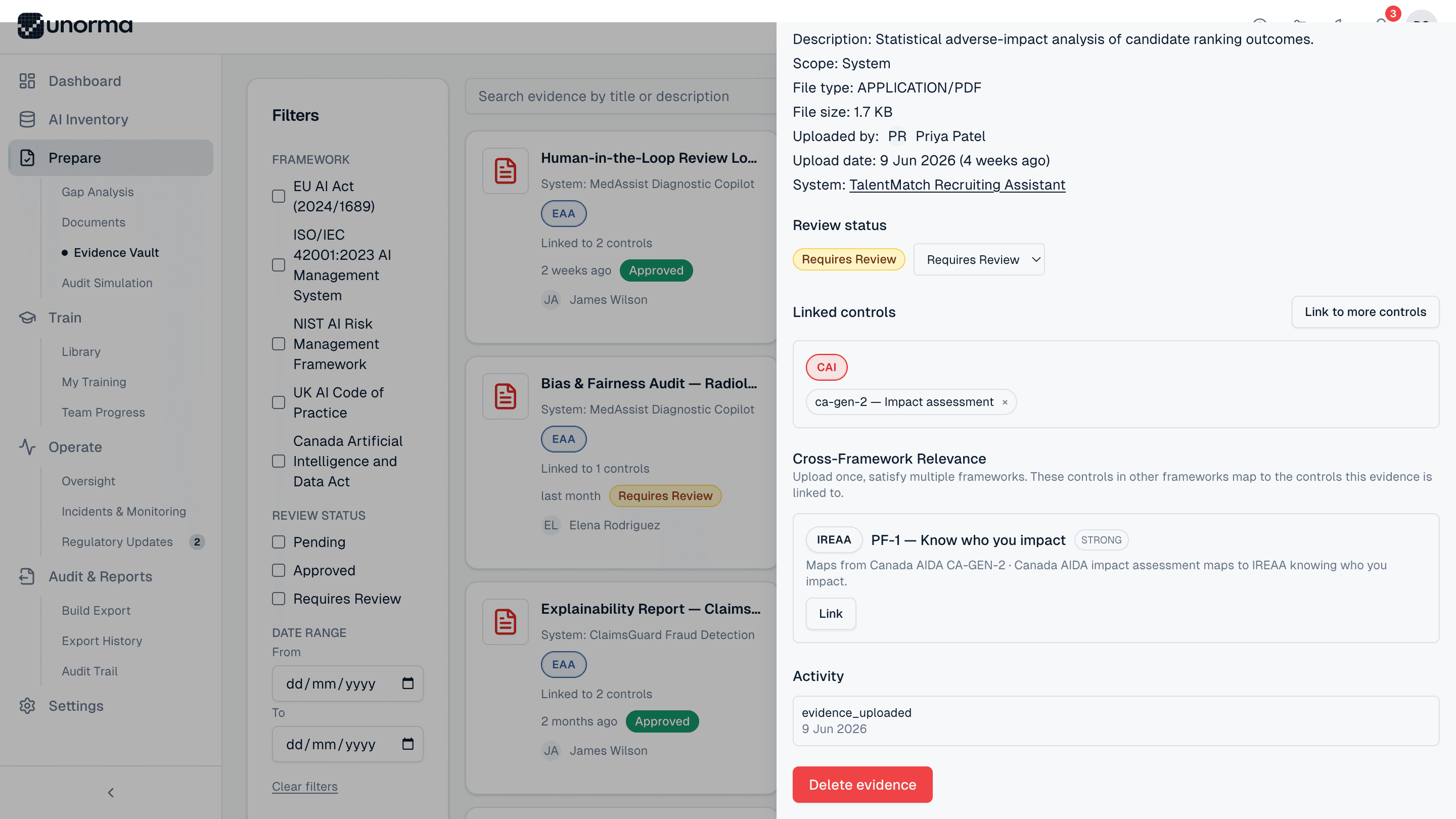
File type, size, uploader, upload date and the system it belongs to are recorded the moment it's uploaded — no manual data entry.
A review status that moves
Pending, Approved or Requires Review, changeable from a simple dropdown, with every change logged to the evidence's activity history.
Controls it proves
Link the evidence to the exact obligation it satisfies — like "CA-GEN-2 — Impact assessment" — directly from the detail view.
Cross-framework relevance, suggested
Unorma surfaces matching controls in other active frameworks — this Canada AIDA impact assessment also strongly satisfies IREAA's "Know who you impact" — link it with one click.
The vault
Built to be searched, not just stored in.
Upload anything
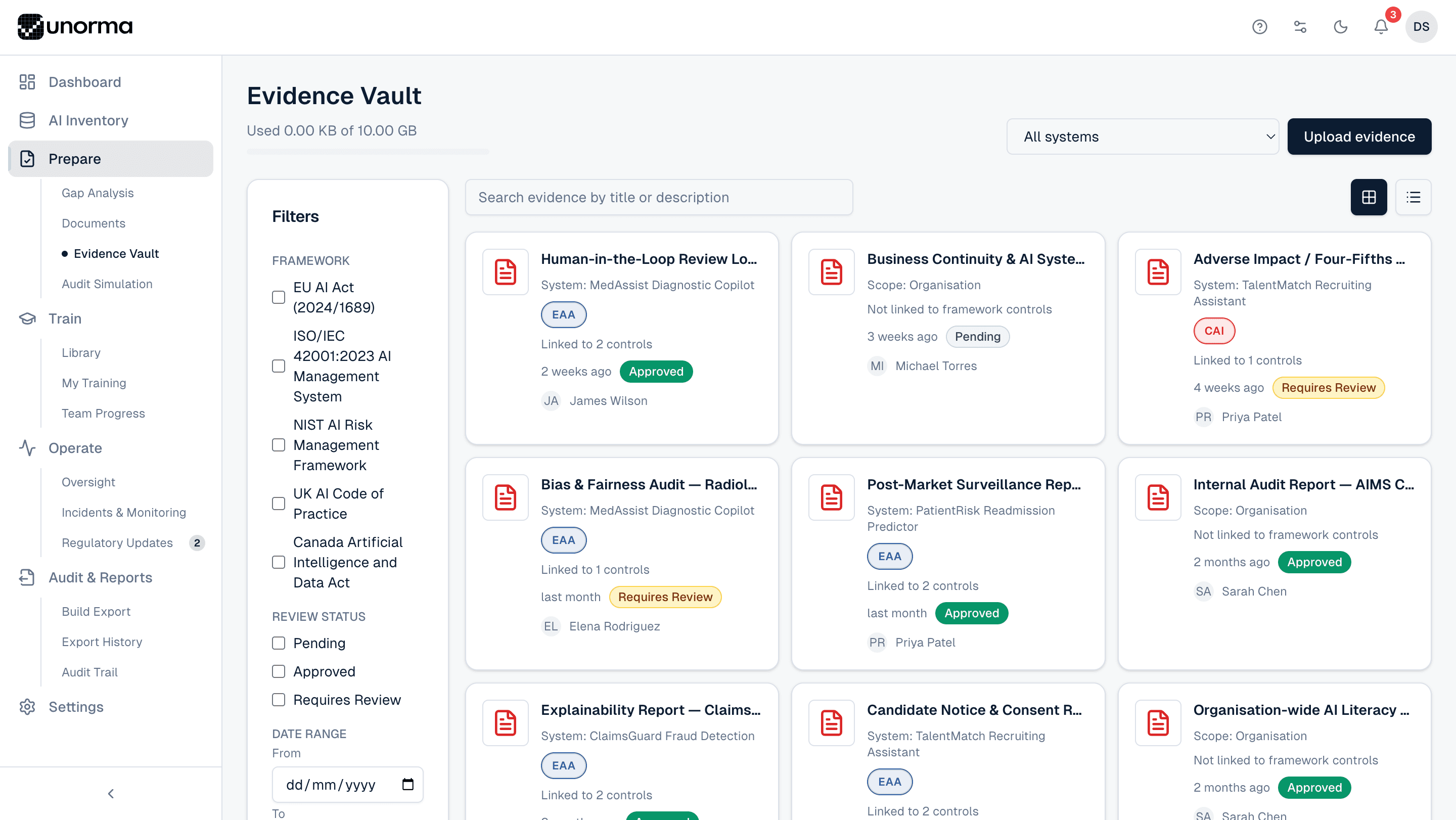
PDFs, screenshots, spreadsheets, certificates, meeting minutes — any file that proves compliance.
Framework filters
Filter the entire vault by EU AI Act, ISO 42001, NIST AI RMF and every other active framework.
Review status filters
Slice the vault by Pending, Approved or Requires Review to see exactly what needs attention.
Search & date range
Search by title or description, or narrow the view to evidence uploaded in a specific window.
Grid or list view
Browse as visual cards or a dense list, whichever suits the task at hand.
Full activity log
Every upload, status change and control link is timestamped in the evidence's own activity history.
Where it fits
The proof behind every obligation.
FAQ
Common questions.
What file types can I upload?
PDFs, images, spreadsheets and more — anything that documents compliance, like test reports, screenshots, certificates or meeting minutes.
What's the difference between System and Organisation scope?
System-scoped evidence proves an obligation for one specific AI system. Organisation-scoped evidence — like a company-wide AI Policy — applies regardless of which system, and shows up under organisation-level obligations.
How does cross-framework relevance work?
When evidence is linked to a control, Unorma checks its built-in library of roughly 100 cross-framework mappings for related controls in your other active frameworks and suggests linking it there too — one upload, multiple frameworks satisfied.
Who approves evidence?
Anyone with Compliance Manager permissions or above can move evidence from Pending to Approved or flag it as Requires Review; the change is recorded in the evidence's activity log.
How much storage do I get?
2 GB on Starter, 10 GB on Scale, and unlimited on Enterprise and Agency. See the full comparison on the pricing page.
Upload your first piece of evidence today.
14-day free trial · No credit card · Full access to every feature.